

🕹️ 1080p vs 1440p vs 4K Gaming — What’s Worth Paying For?
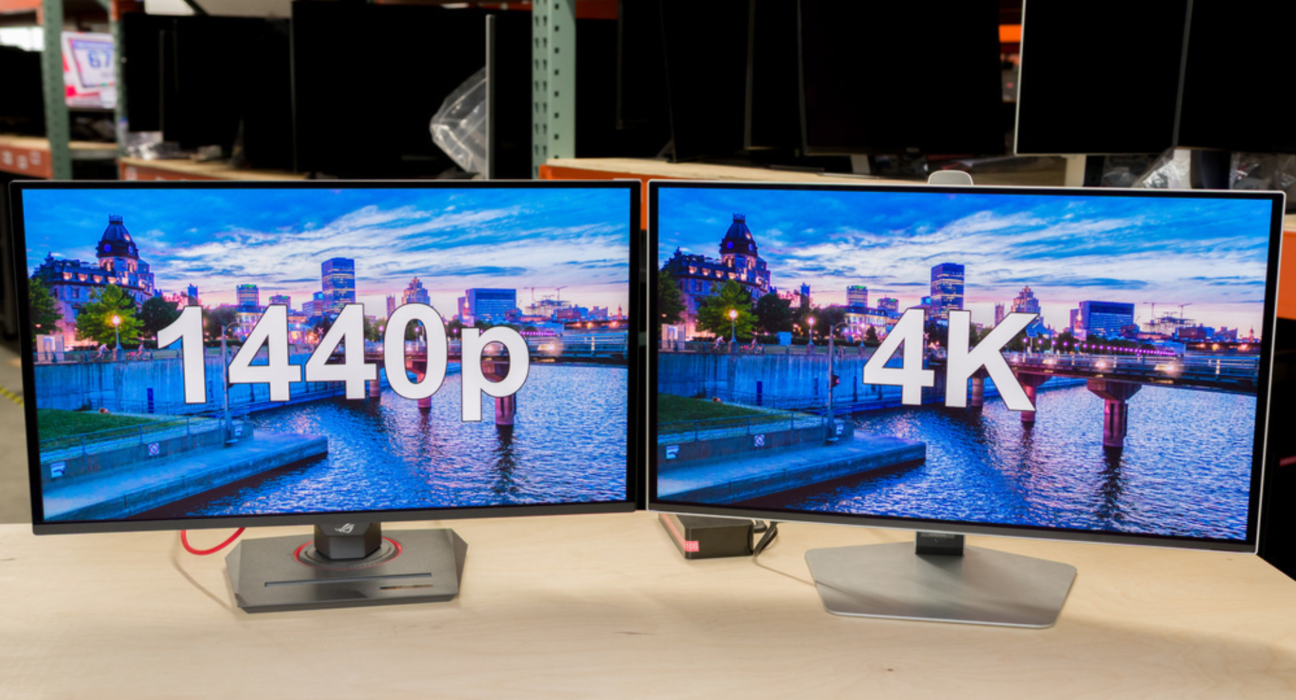
2026 Guide — Honest breakdown of visuals, performance, cost, and real-world gaming value
Choosing a gaming resolution isn’t just about pixels — it’s about performance, hardware cost, smoothness, and how you play. This blog breaks down exactly what you get at each resolution and when it’s worth spending more.
📍 The Basics: What These Resolutions Mean
| Term | Pixels | Relative Detail |
|---|---|---|
| 1080p (Full HD) | 1920 × 1080 | Standard, affordable |
| 1440p (QHD) | 2560 × 1440 | Sharper, balanced |
| 4K (UHD) | 3840 × 2160 | Ultra detailed |
More pixels = more detail, but also = higher GPU load.
🖥️ Visual Quality: What You Actually See
👾 1080p
✔ Smooth visuals
✔ Great clarity in small/medium screens
✔ Ideal for esports & competitive FPS
🎯 1440p
✔ Noticeably sharper than 1080p
✔ Excellent balance of detail & performance
✔ Sweet spot for most gamers
🎬 4K
✔ Very sharp, best detail
✔ Gorgeous in RPGs, open-world, story games
✔ Ideal for large monitors / TVs
Visual difference (subjective):
📍 1080p → Big jump to 1440p
📍 1440p → Noticeable but smaller jump to 4K
👉 Many gamers actually value the boost from 1080p → 1440p more than 1440p → 4K.
⚡ Performance Trade-Offs
Higher resolution = more strain on GPU.
Approx GPU Load
| Resolution | GPU Workload |
|---|---|
| 1080p | Lightest |
| 1440p | Moderate |
| 4K | Very High |
Example (real-world feel):
- A GPU that churns 1440p at 60 FPS might only hit ~30–40 FPS at 4K.
🎮 Best GPUs for Each Resolution (2026)
| Resolution | Target Performance | Typical GPUs |
|---|---|---|
| 1080p | 100–240 FPS | Mid-tier hardware |
| 1440p | 60–165 FPS | Upper-mid tier |
| 4K | 60 FPS+ | High-end GPUs |
⚠ At 4K, ray tracing + max settings really splits performance — DLSS/FSR upscaling helps here.
📊 Gaming Experience Breakdown
🔥 1080p: Smoothest & Most Affordable
✔ Fastest frame rates
✔ Less GPU power needed
✔ Great for gaming rigs under budget
✔ Ideal for competitive FPS games
💡 Best if you care about performance over pure visuals
Who it’s for:
🎮 Esports players
💸 Budget gamers
🏃 Gamers prioritizing 100 + FPS
🌟 1440p: Best Balance
✔ Sharp visuals noticeably better than 1080p
✔ Strong 60 + FPS potential without breaking the bank
✔ Sweet spot for most gamers
Why most gamers prefer it:
- You get higher clarity without needing top-tier GPUs
- Works well for both competitive and story games
Best for:
🧠 General gamers
📺 Mid-to-large PC monitors
🎬 Story and open-world games
📺 4K: The Premium Visual Upgrade
✔ Unmatched detail
✔ Fantastic for immersive single-player games
✔ Looks stunning on large screens
Considerations:
⚠ Requires powerful GPU
⚠ Lower FPS without upscaling
⚠ More expensive overall
Best for:
🎮 Cinematic games
🏝 Open world / RPG fans
📺 Large screens (27″+)
🌐 Upscaling Tech (DLSS / FSR / XeSS)
Modern upscaling bridges the gap by rendering at a lower res and boosting to your target:
✔ DLSS (NVIDIA) – excellent performance gains
✔ FSR (AMD) – wide GPU support
✔ XeSS (Intel) – fast quality upscaling
Benefit:
4K/1440p visuals at 1440p or even 1080p GPU load — huge performance boost.
Result:
Upscaling makes 1440p/4K much more accessible on mid-tier GPUs.
🧠 Audio + UI Impact
- High resolution improves UI/menus and clarity in cinematic games
- For fast FPS games, ultra detail isn’t as noticeable as frame rate
📏 When Each Resolution Makes Most Sense
🖥 1080p
✔ Smaller screens (24″ or less)
✔ Competitive games (CS2, Valorant)
✔ Budget builds
🖥 1440p
✔ 27″ – 32″ monitors
✔ Balanced visuals & speed
✔ Most gamers’ sweet spot
📺 4K
✔ 32″+ screens / TV setups
✔ Story-rich, visually stunning games
✔ Cinematic experiences
💰 Cost Considerations
| Goal | Typical Cost Range |
|---|---|
| 1080p Setup | Most affordable |
| 1440p Setup | Mid-tier investment |
| 4K Setup | Highest upfront cost |
Why cost matters:
- Higher res needs stronger GPU → more expense
- 4K takes biggest budget hit
🏁 So What Should You Choose?
🎯 Best Value for Most Gamers: 1440p
✔ Noticeably sharper than 1080p
✔ Doesn’t need top-end GPU
✔ Works for both competitive and single-player
🏎 Best for Performance: 1080p
✔ Max FPS for esports
✔ Lower cost, higher speed
🎨 Best for Visuals & Immersion: 4K
✔ Stunning detail
✔ Best on large screens
✔ Great with upscaling tech
🧠 Final Verdict
✔ 1080p = Performance & Speed
✔ 1440p = Best Overall Balance
✔ 4K = Visual Premium
For most gamers wanting great graphics + smooth performance — 1440p is the most worth paying for in 2026.
🎮 Pro Tips Before You Buy
✨ Target FPS over Pixels for competitive games
✨ Use upscaling tech (DLSS/FSR) to boost performance
✨ Match resolution to monitor size (bigger screens benefit from higher res)
✨ Check your GPU capability — it decides what you’ll actually get