


OLED vs IPS Monitors: Which Should You Buy?
🔎 What Are OLED and IPS?
🔹 OLED (Organic Light-Emitting Diode)
Each pixel emits its own light — no backlight needed.
How it works: Each pixel can independently turn on or off, giving perfect blacks.
🔹 IPS (In-Plane Switching) LCD
A type of LCD panel that uses a backlight and liquid crystals oriented to improve color and viewing angles.
How it works: Backlight shines through crystals — color accuracy and angles are excellent.
📊 OLED vs IPS — Side-by-Side
| Feature | OLED | IPS |
|---|---|---|
| Black Levels | ⭐⭐⭐⭐⭐ | ⭐⭐ |
| Contrast Ratio | ⭐⭐⭐⭐⭐ | ⭐⭐ |
| Color Vibrancy | ⭐⭐⭐⭐ | ⭐⭐⭐⭐ |
| Refresh Rates | ⭐⭐⭐⭐ | ⭐⭐⭐⭐ |
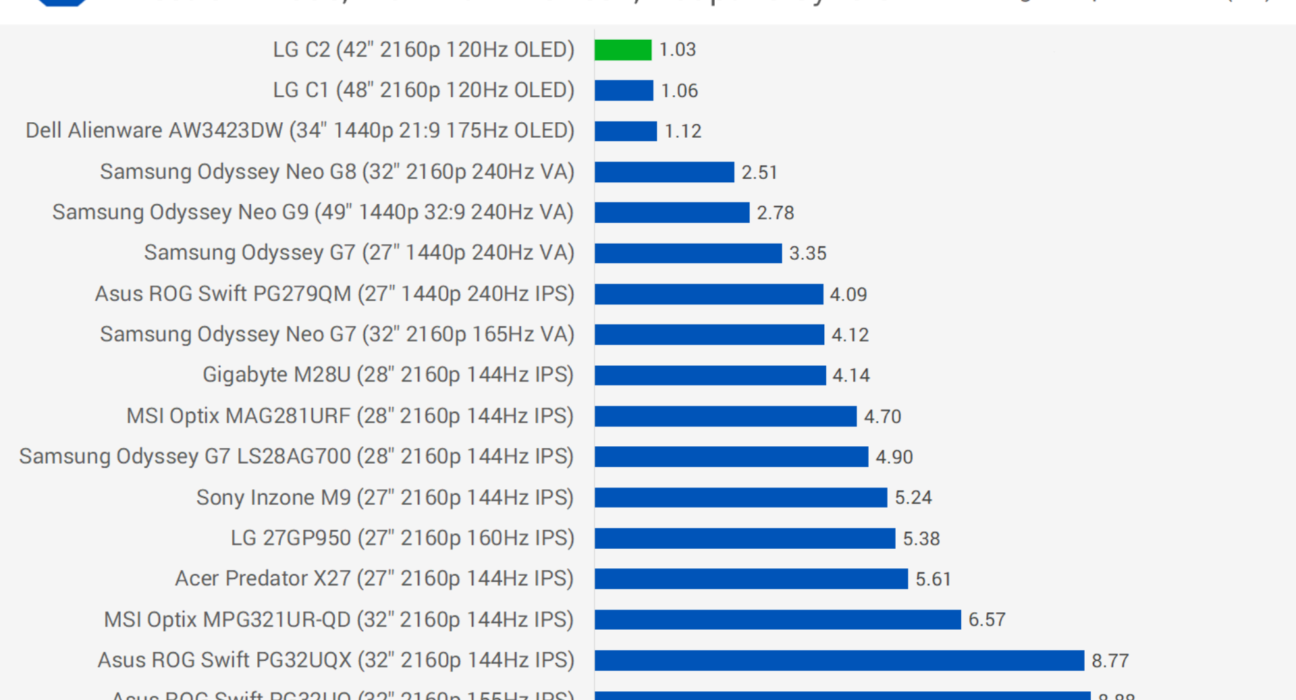
| Response Time | ⭐⭐⭐⭐⭐ | ⭐⭐⭐⭐ |
| Burn-In Risk | ❌ Possible | ❌ Negligible |
| Viewing Angles | ⭐⭐⭐⭐ | ⭐⭐⭐⭐ |
| Brightness | ⭐⭐⭐ | ⭐⭐⭐⭐ |
| Price | ⭐⭐ | ⭐⭐⭐⭐ |
🔥 Key Differences Explained
🖤 1. Black Levels & Contrast
- OLED: True perfect blacks — pixels turn off completely.
- IPS: Backlight always on — blacks look grayish in dark scenes.
Winner: OLED
Great for movies & dark games.
🎨 2. Color Performance
- OLED: Fantastic colors with wide gamut.
- IPS: Excellent color accuracy — often better calibrated for professional creators.
Winner: Tie
OLED is punchy; IPS is reliable and accurate.
⚡ 3. Response Time & Motion
- OLED: Near-instant response, minimal motion blur.
- IPS: Very fast, but slightly slower than OLED.
Winner: OLED
Best for fast gaming.
🌞 4. Brightness
- OLED: Good, but can’t match peak brightness of high-end IPS.
- IPS: Higher sustained brightness — better in bright rooms.
Winner: IPS
⚠️ 5. Burn-In & Longevity
- OLED: Can suffer from burn-in with static content over long periods.
- IPS: No burn-in issues.
Winner: IPS
Better if you work with static screen elements.
💰 6. Price & Value
- OLED: Premium — usually more expensive per inch.
- IPS: More affordable with excellent performance today.
Winner: IPS (for budget)
🎮 Who Should Buy Which?
🏆 Choose OLED If…
✔ You want stunning contrast and deep blacks
✔ You’re into movies, cinematic content, and immersive gaming
✔ You value fast response and vibrant visuals
📌 Best for:
🎬 Film watchers
🎮 Fast-paced gaming
General entertainment setups
OLED is worth the premium if visual quality is your priority.
🖥️ Choose IPS If…
✔ You want high brightness for bright rooms
✔ You work with color-critical tasks (photos, videos, design)
✔ You want longer lifespan & no burn-in risk
✔ You’re on a moderate budget
📌 Best for:
🖌 Content creators
💼 Office / productivity
Bright room setups
Everyday users
IPS gives excellent performance per ₹ — no compromise for most users.
🕹️ Gaming: OLED vs IPS
Both panels support high refresh rates (120Hz, 165Hz, 240Hz), but they differ in feel:
🔹 OLED:
- Incredible motion clarity
- Deep blacks — great in dark games
- Minimal input lag
🔹 IPS:
- Great brightness for bright esports setups
- Lower risk of burn-in with HUD-heavy games
🎮 Gaming choice depends on content:
- Dark, story-based games → OLED
- Competitive FPS with HUD → IPS
🎨 Creative Work: Which Is Better?
🌟 IPS Wins For:
✔ Color accuracy
✔ Calibration consistency
✔ Reliability under long static content
Many professionals still prefer IPS monitors for photo and video work, because they’re predictable and consistent.
📌 Real-World Tips
⏱ Avoiding Burn-In on OLED
- Use screen-savers
- Turn off static UI elements if possible
- Reduce brightness in dark scenes
💡 Bright Room Setup
IPS panels with high brightness (400–600+ nits) outperform OLED here.
🏅 Final Verdict
| Use Case | Best Choice |
|---|---|
| Movies & Dark Scenes | 🏆 OLED |
| Competitive Gaming | ⚔️ Depends (OLED or IPS) |
| Productivity & Office Work | 🖥️ IPS |
| Content Creation | 🎨 IPS |
| Everyday Use | 🤝 Both |
| Budget-Friendly Option | 💸 IPS |
💡 Conclusion
- OLED = Dream Visuals & Deep Blacks
- IPS = Bright, Versatile, Reliable Value
There’s no wrong choice — only the right display for your needs. If your priority is dazzling visuals and cinematic flair, OLED wins. If you want bright rooms, productivity, color work, or the best value per rupee, IPS is often the smarter buy.