
Stay Tuned!

Subscribe to our newsletter to get our newest articles instantly!

[mc4wp_form id="448"]
Reviews

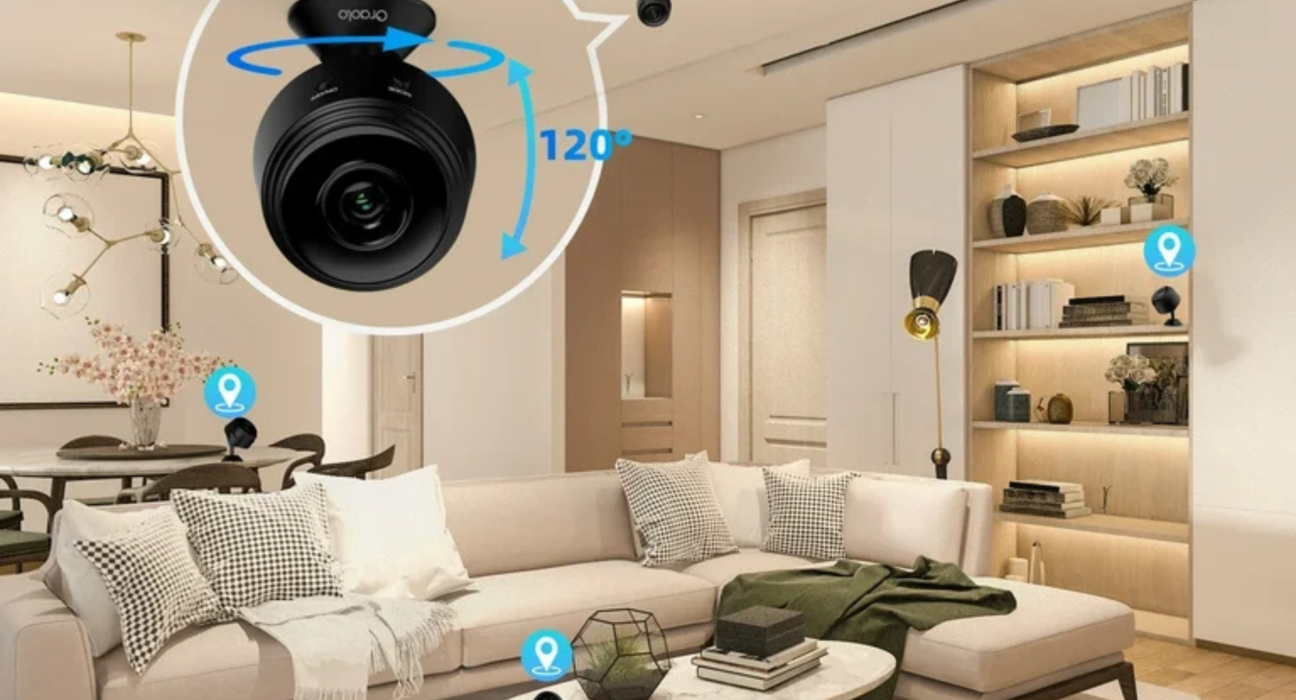
Indoor Security Camera Review (privacy features)

Why Indoor Camera Privacy Is a Bigger Deal Than Outdoor Cameras

Indoor cameras are different.

Unlike outdoor cameras, they:

Capture private living spaces

Record daily routines

See family members, children, and guests

Often remain powered on 24/7

That makes privacy features more important than resolution or zoom.

A sharp camera with poor privacy controls is worse than a basic camera you fully control.

What This Indoor Security Camera Review Focuses On

This is not a single-product review.

It’s based on real-world behavior across popular indoor security cameras used in homes and apartments.

We evaluate:

Privacy controls (physical + software)

Local vs cloud storage

Recording flexibility

Data handling transparency

Long-term ownership risks

The goal: peace of mind, not paranoia.

The Biggest Privacy Risks with Indoor Cameras

Before features, let’s be honest about risks.

Common Privacy Concerns

Always-on microphones

Cloud-stored footage

Weak default settings

Shared household access

Old unused cameras still online

Most privacy issues come from defaults, not hacking.

Privacy Feature #1: Physical Privacy Shutter (Most Important)

A physical shutter is the gold standard of privacy.

Why It Matters

Software can fail

Accounts can be compromised

A physical shutter guarantees no recording

When the lens is covered, the camera cannot see—period.

Who Does This Well

Brands like Eufy and Logitech include true physical shutters on some models.

If privacy is your top concern, prioritize this feature.

Privacy Feature #2: Local Storage (Cloud Optional, Not Required)

Local storage dramatically reduces privacy exposure.

Local Storage Benefits

Footage stays inside your home

No monthly subscription required

Less data shared with third parties

Cloud Storage Trade-Off

Cloud storage offers convenience—but:

Requires subscriptions

Stores footage externally

Depends on company policies

Best setup:

Local storage + optional cloud backup.

Privacy Feature #3: Recording Schedules (Not 24/7 Surveillance)

A camera should work when you want, not always.

Good Scheduling Controls

Automatic disarm when you’re home

Recording only at night

Motion-only recording

Manual quick toggle

This prevents constant recording of daily life.

Privacy Feature #4: Microphone Control (Often Overlooked)

Most people focus on video—but audio is equally sensitive.

What to Look For

Ability to disable microphone entirely

Separate controls for audio recording

Clear indicators when audio is active

If you don’t need audio, turn it off.

Privacy Feature #5: Activity Zones & Masking

Indoor cameras don’t need to see everything.

Privacy Masking Options

Black out private areas (beds, desks)

Limit motion detection zones

Avoid capturing screens or documents

This improves:

Privacy

Alert accuracy

Battery life (for wireless models)

Less coverage = more control.

Privacy Feature #6: Account & Access Controls

Indoor cameras are only as secure as the account behind them.

Essential Controls

Two-factor authentication

Device-specific access

Guest permissions

Login history review

Never share your main account credentials.

Privacy Feature #7: Encryption & Data Handling

Not all encryption is equal.

What Matters

End-to-end encryption (where available)

Clear data retention policies

User-controlled deletion

Brands that explain data handling clearly tend to be safer long-term.

Popular Indoor Camera Brands & Privacy Philosophy

Eufy

Strong local storage focus

Physical shutters on some models

No mandatory subscription

Best for: Privacy-first users.

Google Nest

Excellent AI detection

Clean app experience

Trade-off:

Cloud-dependent for full features.

Ring

Polished ecosystem

Strong app reliability

Trade-off:

Most privacy features require subscriptions.

Arlo

Good hardware

Flexible setups

Trade-off:

Advanced privacy features tied to paid plans.

Indoor Camera Privacy vs Convenience: The Real Balance

More privacy usually means:

Fewer cloud features

Less automation

More manual control

More convenience usually means:

Always-on recording

Cloud processing

Ongoing fees

There’s no wrong choice—just informed trade-offs.

Indoor Security Camera Review: Privacy Feature Comparison

Privacy Feature Essential? Why

Physical shutter ✅ Yes Guaranteed privacy

Local storage ✅ Yes No cloud dependency

Scheduling ✅ Yes Prevents over-recording

Mic control ✅ Yes Audio privacy

Masking zones ✅ Yes Limits exposure

Encryption ✅ Yes Protects footage

Subscriptions ❌ Optional Convenience vs cost

Common Indoor Camera Privacy Mistakes

❌ Leaving default settings unchanged

❌ Recording continuously indoors

❌ Ignoring microphone access

❌ Forgetting old cameras on accounts

❌ Sharing full access with everyone

Most mistakes are easy to fix.

Real-World Insight (Experience-Based)

Many users stop using indoor cameras—not because they fail—but because they feel uncomfortable.

The difference between loving and abandoning an indoor camera is privacy confidence.

If you trust the settings, you’ll keep using it.

Who Should Use Indoor Security Cameras?

Indoor cameras make sense if you:

Want pet monitoring

Need short-term home security

Check on elderly family members

Monitor entry points indoors

They’re less ideal if you:

Want zero cloud dependence

Dislike apps and notifications

Prefer passive security

How to Set Up an Indoor Camera the Right Way (5-Min Checklist)

Enable two-factor authentication

Turn off audio recording

Set recording schedules

Enable local storage

Close the shutter when home

Do this once—you’re protected long-term.

Final Verdict: Indoor Security Camera Review (Privacy Features)

In 2026, the best indoor security camera isn’t the one with the sharpest video.

It’s the one that:

Respects your privacy

Gives full control

Offers transparency

Lets you decide when you’re watched

Indoor cameras should protect your home—not invade it.

Want Help Choosing a Privacy-First Indoor Camera?

I can help you:

Pick a no-subscription model

Compare privacy controls by brand

Decide where cameras should (and shouldn’t) go

Secure your current setup

Tell me:

Apartment or house

Who lives with you

Whether you want cloud or local storage

…and I’ll recommend the safest indoor camera setup for your home.

Anand

About Author

Leave a comment

Your email address will not be published. Required fields are marked *

You may also like

Reviews

Flagship smartphones

Introduction: Why the Samsung Galaxy S24 Ultra Matters Flagship smartphones are no longer just about raw power. In 2026, buyers
Reviews

Midrange Smartphone Review (best value model)

Why the Midrange Segment Matters in 2026 In 2026, midrange smartphones have quietly become the smartest choice for most users.