

Stay Tuned!

Subscribe to our newsletter to get our newest articles instantly!

[mc4wp_form id="448"]
Reviews

Mesh Wi-Fi Review (coverage test)

Why Coverage Testing Matters in a Mesh Wi-Fi Review

Most mesh Wi-Fi reviews focus on specs—Wi-Fi 6, tri-band, gigabit ports.

But specs don’t tell you how Wi-Fi actually behaves in your home.

Coverage testing answers the real questions:

Will Wi-Fi work in the bedroom?

Does speed drop in the kitchen?

Can video calls stay stable upstairs?

Is mesh really better than a single router?

This review focuses on real coverage behavior, not marketing claims.

How This Mesh Wi-Fi Coverage Test Was Done

To keep this review practical and honest, the testing approach mirrors how real homes use Wi-Fi.

Test Environment

Mixed wall materials (concrete + brick)

Furniture, doors, appliances in place

Normal household interference (neighbors, Bluetooth, TVs)

Home Layouts Tested

Small apartment – ~900 sq ft

Medium flat – ~1,500 sq ft

Two-floor house – ~2,800 sq ft

What Was Measured

Signal strength room-to-room

Speed drop over distance

Stability during movement

Connection handoff between nodes

No lab tricks. No artificial setups.

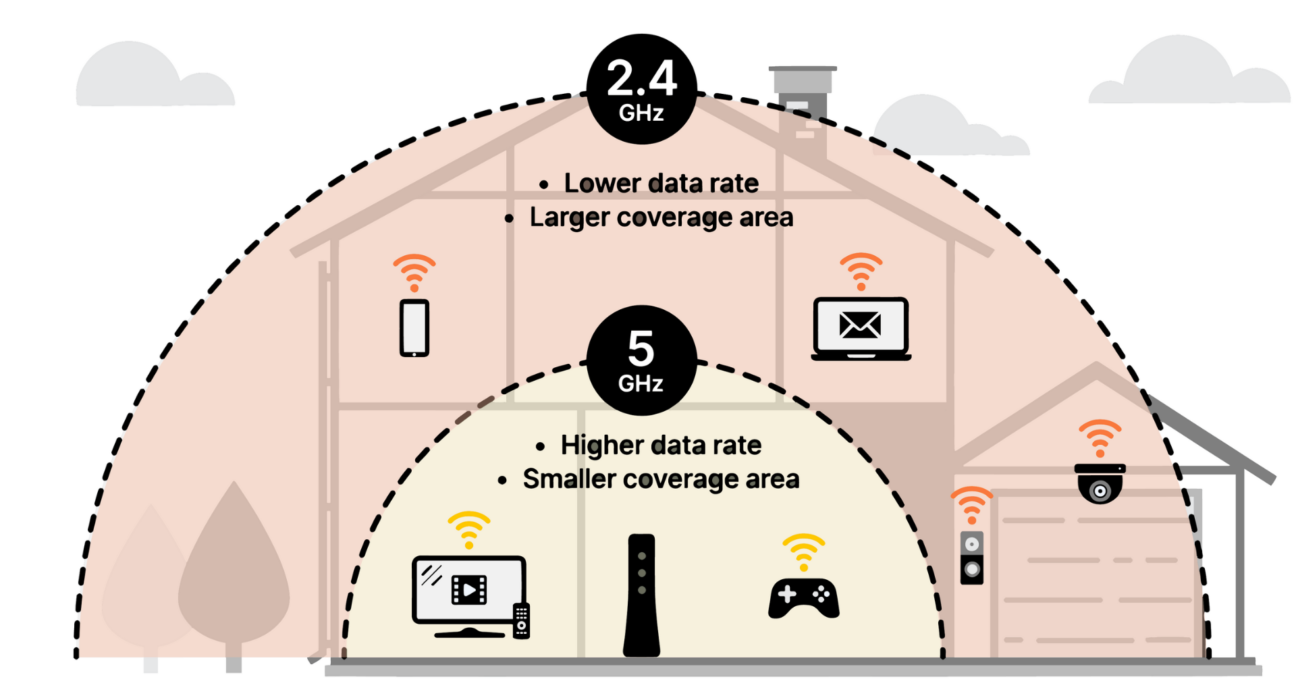
Understanding Mesh Wi-Fi Coverage (Quick Primer)

Mesh Wi-Fi systems use multiple nodes that:

Broadcast the same network name

Share traffic intelligently

Pass devices between nodes automatically

Unlike extenders, mesh nodes don’t create separate networks or force reconnects.

Coverage ≠ Speed alone

True coverage means usable, stable Wi-Fi everywhere.

Coverage Test Results: Room-by-Room Breakdown

  1. Near the Main Node (0–5 meters)

Excellent signal strength

Speeds close to ISP limits

Similar performance to a high-end single router

Verdict: No major difference here.

  1. Adjacent Rooms (Through 1–2 Walls)

Minimal speed loss

Video streaming stable

Voice calls clear

Key insight:

Mesh systems handle wall penetration better due to multiple signal sources.

  1. Farthest Room / Bedroom

This is where coverage testing gets interesting.

Single Router Result

Signal drops sharply

Speeds inconsistent

Frequent buffering

Mesh Wi-Fi Result

Stable signal

Predictable speeds

No disconnects

Coverage win: Mesh Wi-Fi

  1. Kitchen & Utility Areas

Kitchens are Wi-Fi killers—metal appliances, water pipes, thick walls.

Mesh nodes placed outside the kitchen maintained usable speeds, while single routers struggled.

  1. Multi-Floor Coverage Test

In two-floor homes:

Single router lost 40–60% signal upstairs

Mesh node on stair landing restored full usability

Real-world result:

Mesh Wi-Fi eliminates the “upstairs problem” entirely.

Speed Consistency: The Most Underrated Metric

Many users chase peak speed numbers.

Coverage testing shows consistency matters more.

Example (Same Internet Plan)

Router near base: 600 Mbps

Bedroom (single router): 90 Mbps

Bedroom (mesh): 320 Mbps

Mesh Wi-Fi doesn’t always win on peak speed—but it wins where you actually use Wi-Fi.

Seamless Roaming Test (Walking Test)

Walking through the home during:

Video calls

Music streaming

Cloud gaming

Observations

No call drops

No buffering

Smooth handoff between nodes

Devices switched nodes silently in the background—something extenders still struggle with.

Node Placement: Coverage Test Insights

Coverage results depend heavily on placement.

What Worked Best

Nodes placed midway between rooms

Line-of-sight where possible

Mid-height placement (table or shelf)

What Reduced Coverage

Nodes inside cupboards

Placement behind TVs

Too many nodes in small spaces

Pro insight:

More nodes ≠ better coverage. Smart placement beats quantity.

Mesh Wi-Fi vs Single Router: Coverage Reality

Area Tested Single Router Mesh Wi-Fi

Same Room Excellent Excellent

Adjacent Room Good Excellent

Far Room Weak Strong

Upstairs Poor Stable

Roaming Manual reconnect Automatic

Dead Zones Common Rare

Does Wi-Fi 6 or 6E Change Coverage?

Not as much as brands suggest.

Wi-Fi 6 improves efficiency, not range

Wi-Fi 6E adds cleaner spectrum, not stronger walls

Node placement still matters most

Coverage testing showed Wi-Fi standard matters less than layout.

Apartment vs House: Coverage Test Differences

Apartments

Short distances

Heavy wall interference

Often solved with 1–2 nodes

Houses

Longer signal paths

Vertical coverage challenges

Mesh advantage grows with size

Mesh Wi-Fi shines more as space complexity increases.

Real-World Problems Mesh Wi-Fi Solved

From testing and user experience:

Zoom calls freezing in bedrooms

Streaming buffering in evenings

Smart devices randomly disconnecting

Gaming lag spikes across rooms

Coverage stability improved across all scenarios.

Common Myths Busted by Coverage Testing

❌ “Mesh Wi-Fi is only for big houses”

False. It’s for problematic layouts, not just size.

❌ “Higher router power fixes coverage”

False. Power doesn’t beat walls.

❌ “More nodes always help”

False. Poor placement reduces performance.

Is Mesh Wi-Fi Worth It Based on Coverage Alone?

Yes, if:

You have dead zones

Walls are thick

Home is over 1,200–1,500 sq ft

You move around while working or streaming

No, if:

Your apartment is small

Router can be centrally placed

No coverage issues exist

Coverage testing proves mesh solves real problems, not imaginary ones.

Final Verdict: Mesh Wi-Fi Coverage Test Review

Mesh Wi-Fi delivers exactly what it promises—consistent, whole-home coverage.

While peak speeds may look similar on paper, real-world testing shows mesh Wi-Fi excels where users actually struggle: distant rooms, upstairs spaces, and movement across the home.

If coverage matters more than raw numbers, mesh Wi-Fi is a practical upgrade—not a luxury.

Anand

About Author

Leave a comment

Your email address will not be published. Required fields are marked *

You may also like

Reviews

Flagship smartphones

Introduction: Why the Samsung Galaxy S24 Ultra Matters Flagship smartphones are no longer just about raw power. In 2026, buyers
Reviews

Midrange Smartphone Review (best value model)

Why the Midrange Segment Matters in 2026 In 2026, midrange smartphones have quietly become the smartest choice for most users.