

📺 Streaming Subscriptions: How to Save Money (Cancel, Rotate & Still Watch Everything)
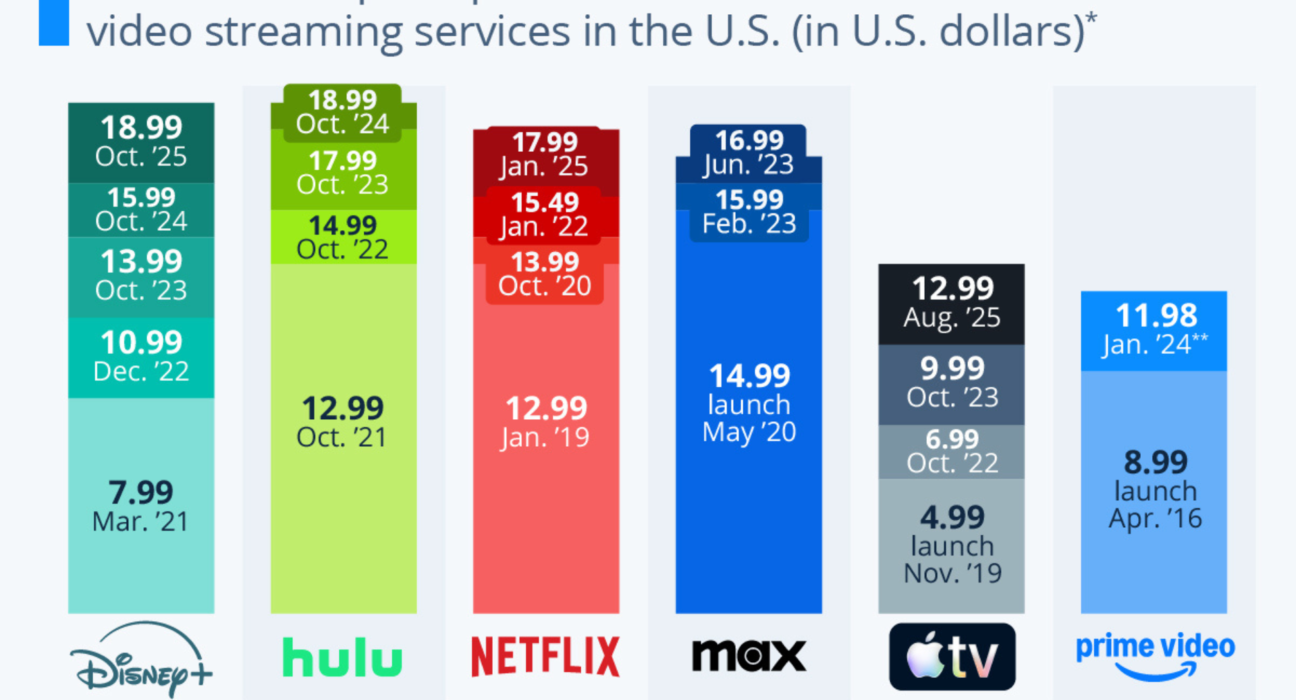
💸 Step 1: Audit What You’re Actually Paying For
Before cutting anything:
✔ List all streaming services
✔ Check monthly cost
✔ Note renewal dates
✔ Identify which ones you actually used last month
Many people pay for 3–5 services they barely open.
🔄 The “Rotate” Strategy (The Smartest Hack)
Instead of keeping everything active:
👉 Subscribe → Watch → Cancel → Switch
Example rotation:
| Month | Service |
|---|---|
| January | Netflix |
| February | Disney+ |
| March | Prime Video |
| April | Apple TV+ |
Most shows release full seasons at once — so you can binge in one month and cancel immediately.
You still watch everything — just not simultaneously.
📅 How Rotation Works in Real Life
Step-by-Step:
- Choose ONE platform per month.
- Watch everything you care about.
- Cancel before renewal.
- Move to the next platform.
Most platforms make re-subscribing easy.
🧠 Why This Works
Streaming platforms:
- Don’t penalize cancellations
- Keep your watch history
- Allow you to return anytime
They rely on people forgetting to cancel.
📉 Cut Costs Even Further
1️⃣ Use Annual Plans (If You Use It All Year)
Only commit annually if:
✔ You use it every month
✔ There’s a real discount
2️⃣ Use Bundles
Some bundles cost less than individual plans:
- Internet provider + streaming
- Mobile carrier perks
- Music + video bundles
Always compare total cost.
3️⃣ Share Family Plans (Legally)
Most services allow:
✔ 4–6 profiles
✔ Multiple devices
Split the cost within household rules.
4️⃣ Downgrade Tiers
Do you really need:
- 4K on every screen?
- 4 simultaneous streams?
- Ad-free always?
Sometimes the cheaper tier is fine.
🧮 Example: Real Savings
Let’s say you pay:
- Netflix → ₹649
- Disney+ → ₹299
- Prime → ₹299
- Apple TV+ → ₹199
Total monthly = ₹1,446
Using rotation (1 service/month):
Average cost ≈ ₹300–₹650
👉 Annual savings can exceed ₹8,000–₹12,000.
🎯 Who Should Rotate?
✔ Casual viewers
✔ Budget-conscious households
✔ People who binge series
✔ Families watching different shows monthly
🚫 When NOT to Cancel
Don’t rotate if:
- You watch daily sports tied to one platform
- Kids need consistent access to one service
- You use Prime mainly for shipping benefits
🧠 Smart Monthly Rotation Plan Example
Quarter 1:
- Jan → Netflix (big originals)
- Feb → Disney+ (Marvel/Star content)
- Mar → Prime (new releases)
Quarter 2:
- Apr → Apple TV+
- May → Netflix
- Jun → Disney+
You still watch everything — just smarter.
🔔 Set Cancel Reminders
Always:
✔ Cancel immediately after subscribing
✔ Or set a calendar reminder 3–5 days before renewal
Most services let you keep access until the billing period ends.
💡 Bonus Tip: Watch for Limited-Time Deals
- Festival sales
- Black Friday deals
- Student discounts
- Free trial offers
Sometimes you can stack rotation with discounted months.
🏁 Final Takeaway
You don’t need to cancel everything — you just need to avoid paying for everything at once.
✔ Subscribe intentionally
✔ Binge efficiently
✔ Cancel confidently
✔ Rotate smartly
Streaming is flexible — use that flexibility to your advantage.